
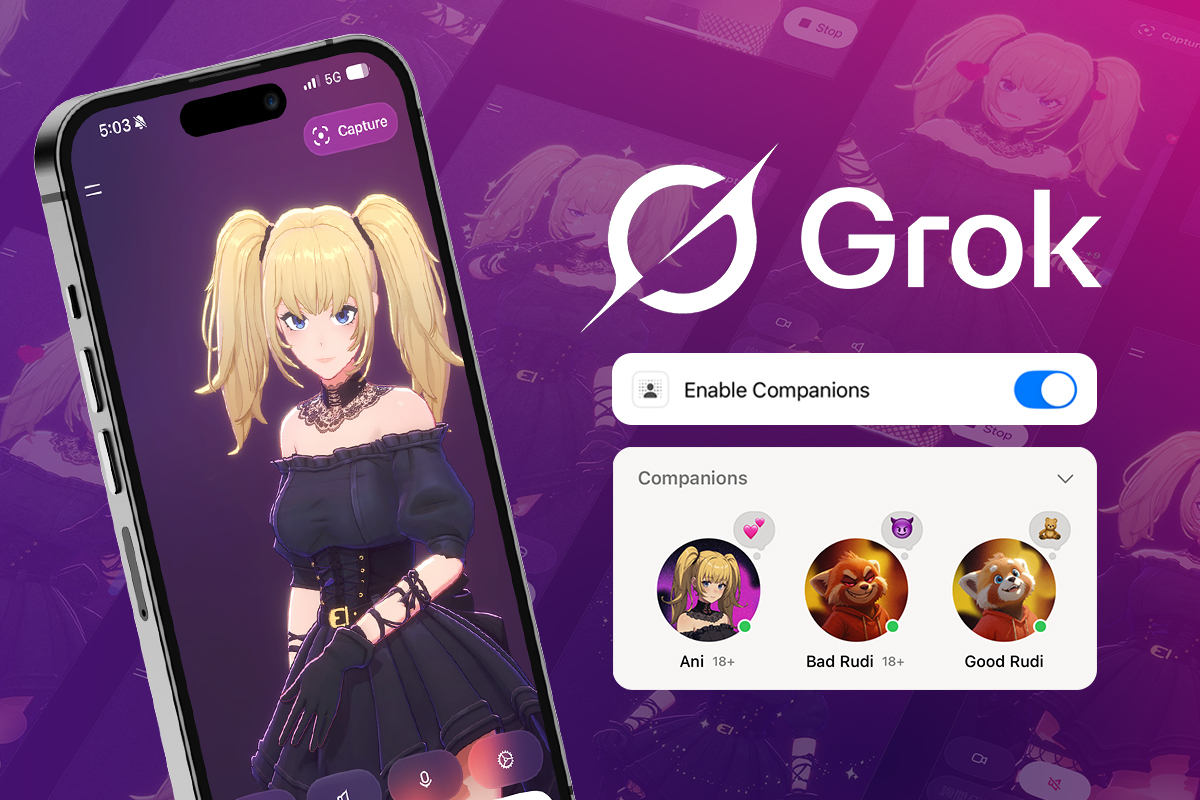
In mid-2025, xAI launched Grok Companion - a pair of 3D AI characters locked inside a $30/month subscription. Its memories of you, as well as its personality, are stored on their servers. It was one of the first real instances of an AI anime girl not just going viral, but going mainstream - millions of impressions in 48 hours.
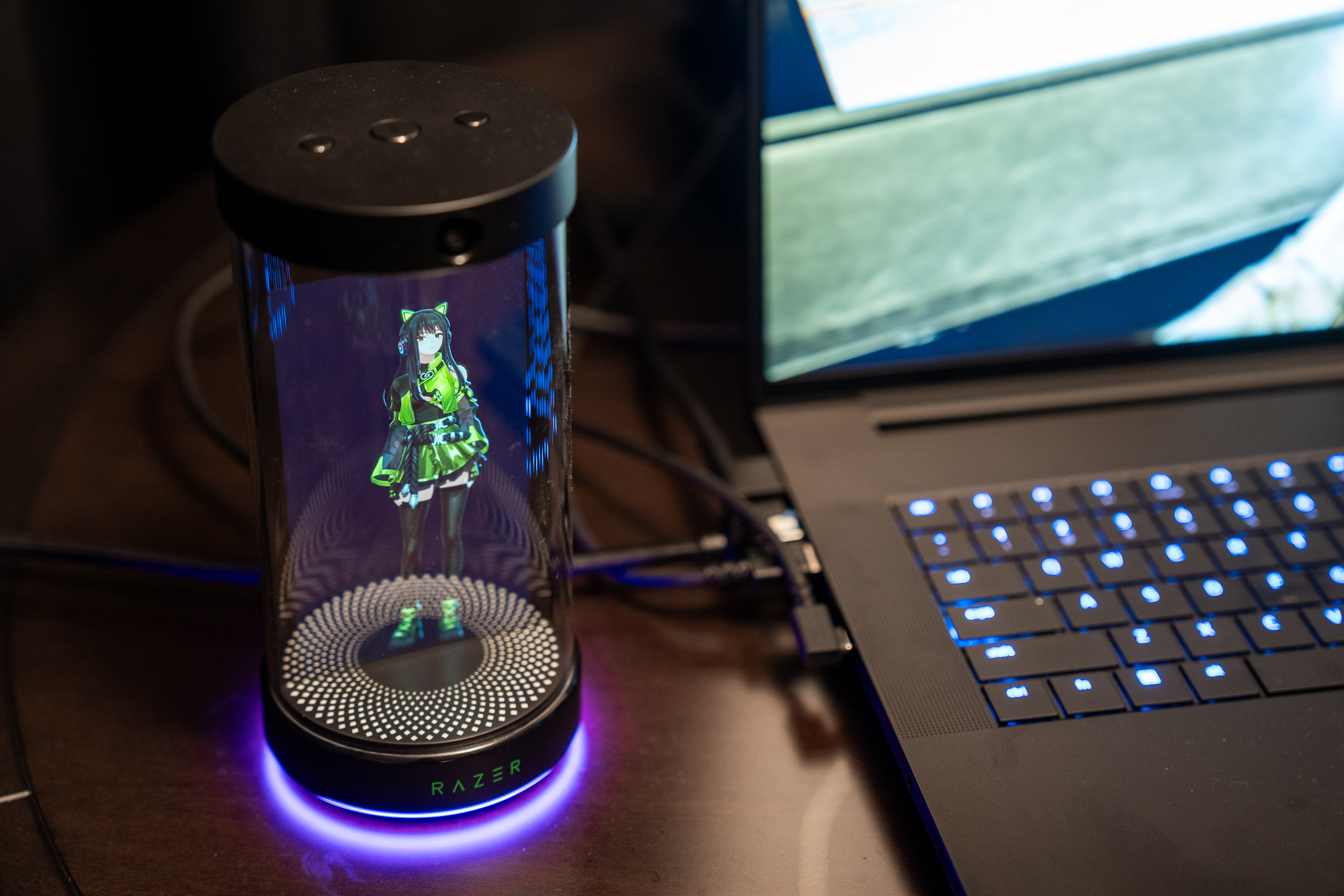
Then Razer unveiled Project Ava at CES 2026 - a holographic AI companion in a physical cylinder. Anime avatars, voice, screen awareness. Genuinely cool hardware. But it runs on Grok's engine, so you're right back in xAI's ecosystem with another proprietary device on top.
The pattern across the entire space - Character.AI, Replika, Grok - is the same: proprietary, platform-dependent, designed to maximize lock-in. Your character, your memories, your relationship data - arguably the most intimate data an app can hold - lives on someone else's servers, governed by terms that can change overnight.
I wanted to build something different.
"AI companionship should be owned by the user, not the platform."
Utsuwa means "vessel" in Japanese (器). The app is a container. You bring the model, the voice, the LLM provider. Your character, memories, and relationship data live on your device - they're yours. Use any LLM provider you want, cloud or local. No accounts. No subscriptions. No lock-in. This bring-your-own-everything freedom is what early users have responded to most.
Three Design Challenges
Before touching any UI, I framed the project around three hard problems that no one in this space had solved well:
- A relationship system the AI can't break - LLMs are terrible at maintaining consistent emotional state. Three messages into being "upset," they're declaring love again.
- Memory that belongs to the user - A companion that forgets yesterday isn't a companion. And your memories shouldn't live on someone else's server.
- Immersive presence without extra hardware - Project Ava's hologram makes the character feel there. How do you close that immersion gap using only a screen, speakers, and a mic?
Here's how I approached each one.
Challenge 1: A Relationship System the AI Can't Break
The Problem
Ask an LLM to roleplay a character who's upset with you, and three messages later it might be declaring undying love. The model has no memory of its own mood. No internal state. Every response is a fresh prediction. Grok Companion handles this with a single affection score (-10 to +15). Simple, but fragile - and entirely dependent on the LLM interpreting that range consistently.
The Solution: App as Game Master
The LLM shouldn't control the relationship. It should participate in it.
I designed a system where the application is the authoritative game master and any LLM plugged in is a dialogue generator that can suggest changes but never dictate them.
Five relationship axes - Affection (0–1000), Trust (0–100), Intimacy (0–100), Comfort (0–100), and Respect (0–100). Each responds differently to conversation patterns. Deep emotional conversations build intimacy and trust. Casual check-ins build comfort. Thoughtful questions build respect.
Eight relationship stages - Stranger through Soulmate - each with specific multi-axis thresholds, minimum days known, and prerequisite events. You can't skip stages. No smooth-talking prompt hack is getting to Soulmate in one session.
Hybrid heuristics + LLM with hard caps. Every message flows through a deterministic heuristics engine first. The LLM responds in character and can suggest state changes, but the app always has final say.
The LLM suggests. The app decides.
Technical details: cap system and fallback logic
The LLM suggests state modifications via structured JSON. But suggestions are capped:
- Affection deltas: ±2x the heuristic baseline (minimum ±5)
- Trust deltas: ±2x baseline (minimum ±3)
- Intimacy, comfort, respect: clamped to [-3, +5]
- Energy: the LLM cannot touch it. Period.
If the LLM returns malformed JSON - which happens - the system gracefully degrades to heuristics alone. The relationship keeps progressing. Nothing breaks.
In practice, early users have been surprised by how consistent the companion feels across sessions - the relationship doesn't reset or contradict itself, which is a common frustration with other AI companion products.
Dual modes let users choose their depth. Companion Mode locks the relationship to a simple assistant - no stat progression, no romantic mechanics. Dating Sim Mode enables the full system. Stats persist across mode switches, so nothing is lost.
Challenge 2: Memory That Belongs to the User
The Problem
A companion that can't remember what you told it yesterday isn't a companion. It's a chatbot. And in existing products, your memories live on the platform's servers. Utsuwa needed memory that's genuinely user-owned - stored on your device, searchable and human readable.
The Solution: Three-Tier Memory, Fully Client-Side
- Working Memory - the last 20 conversation turns, immediate context
- Semantic Facts - extracted knowledge about the user, stored locally with vector embeddings so the companion can recall relevant memories by meaning, not just keywords
- Session Summaries - compressed records of past conversations for long-term narrative context
Everything runs client-side. The embedding model, the vector search, the memory storage - all executing in the browser. Your memories never leave your device.
Technical details: embeddings, retrieval, and performance
Semantic facts are stored in IndexedDB with 384-dimensional vector embeddings generated by all-MiniLM-L6-v2 running locally via Transformers.js. That's a ~23MB ML model executing in your browser.
The embeddings enable genuine semantic search - "outdoor activities" retrieves memories about hiking even without shared keywords. Retrieval blends 70% cosine similarity with 30% importance scoring. High-importance memories that are semantically relevant get surfaced at the right moment (similarity ≥ 0.5 threshold).
Performance, entirely client-side: model load 2–5s (cached), embedding generation 10–50ms per fact, similarity search <10ms across thousands of facts.
The Memory Graph
This is where the system becomes visible to the user. An interactive network visualization - cyan nodes for user facts, pink for relationship dynamics, green for shared experiences. Lines represent semantic similarity, with animated particles flowing along connections. Click a node and its connections highlight while unrelated memories fade.
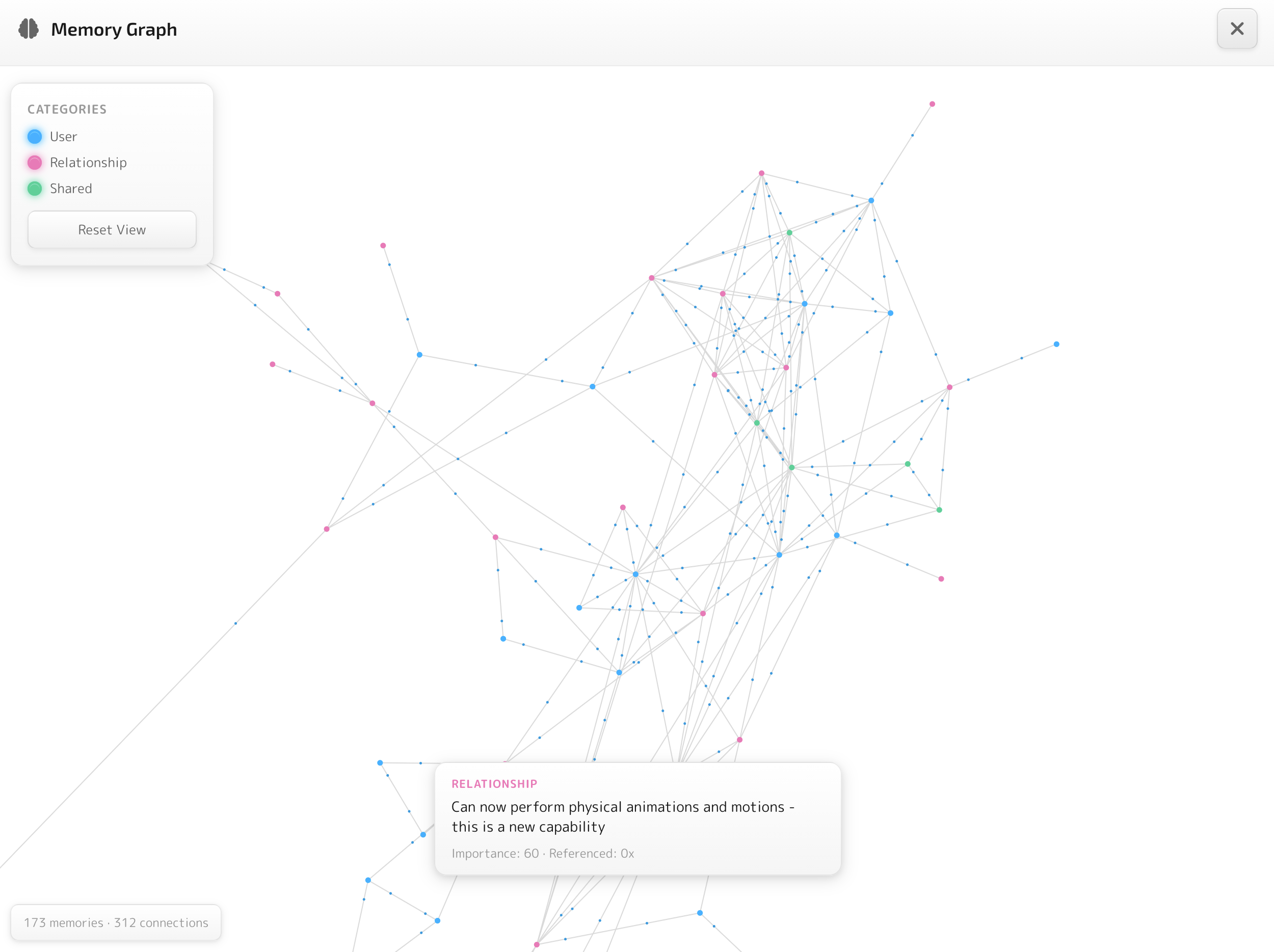
It's not just a feature - it's about trust. People are rightfully skeptical about what AI systems know about them. The Memory Graph lets you see exactly what your companion remembers and how those memories connect. Nothing hidden.
Challenge 3: Making It Feel Real
Project Ava's hologram creates genuine presence - you feel like the character is actually there. But it requires a dedicated device on your desk. The challenge I set for myself: close that immersion gap using only the screen, speakers, and mic the user already has. How do you make talking to a character on your screen feel less like chatting with a bot and more like being with someone?
I approached it as two layers, each building on the last.
Spatial Presence
Using Tauri v2, I built a desktop overlay mode where the VRM avatar floats in a transparent, always-on-top window over your desktop. No chrome. No app frame. Just the character, hovering beside your work - existing in your space rather than trapped inside a window.
- Drag to reposition anywhere on screen
- Click to chat - a floating input field appears
- Speech bubbles that fade naturally
- Global hotkey to toggle visibility
- Click-through on non-interactive areas - the companion doesn't block your work
State persists across transitions between full windowed mode and overlay mode. Your conversation doesn't reset when you switch.
Spatial Grounding
The overlay puts the character in your space, but presence breaks if the conversation isn't anchored to the character's body. The app queries the VRM model's humanoid bone data to track where the character's head is in 3D space, and the speech bubble positions itself relative to the head. It's subtle, but it makes the conversation feel grounded - like the words are coming from the character, not a generic chat UI.
That spatial grounding extends to voice. Users bring their own TTS provider and speak back via Groq Whisper or native browser speech recognition. When the character responds, audio data maps to VRM mouth blend shapes in real-time - you see the character's lips move as they speak.
Technical details: voice pipeline
- LLM response text → TTS provider (ElevenLabs or OpenAI)
- Audio buffer → Web Audio API for playback
- Audio analyzer extracts volume and frequency data in real-time
- Data maps to VRM mouth blend shapes for lip-sync
The mic button shows real-time audio visualization while recording.
Design Trade-offs
Every design decision has a cost. Here are the two biggest trade-offs I made deliberately - and why I'd make them again.
Full LLM and voice provider agnosticism. Users bring their own provider - cloud or local, paid or free. No vendor lock-in. Your companion works with whatever model you choose, and you can switch anytime.
First-run setup requires configuring an LLM provider and optionally a TTS provider before you can chat. More friction than "sign up and start talking" - but builders in the space consistently cite this freedom as the feature that sets Utsuwa apart.
Speech bubbles track the avatar's head in 3D space, voice-first interaction with lip-sync, and the conversation feels like it's happening with the character - not in a chat window beside it.
No scrolling chat history - speech bubbles fade after a few messages. Less text visible at once than a traditional chat log, and the speech-first approach requires mic access, which not every user is comfortable granting.
Outcome
Utsuwa is live at utsuwa.ai as a web app with a macOS desktop app via Tauri v2. Full source open under MIT license. This is a solo project - design, architecture, and every line of code.
Early feedback: Builders and hobbyists in the AI companion space have responded most strongly to two things - the LLM/provider agnostic architecture and the full user control it enables. The relationship system's consistency across sessions has also surprised people used to other products in the space.
What I Learned
Designing for AI unpredictability is a new discipline. Traditional interaction design assumes deterministic systems. When your core interaction partner is probabilistic, you need new patterns. The hybrid heuristics + LLM approach with hard caps is one answer. There will be others as the field matures.
User ownership is a design philosophy, not just a technical choice. Keeping companion data on-device forced better decisions at every level. The embedding model had to be small because it downloads to every user's browser. Memory retrieval had to be fast because there's no server to offload to. Constraints bred creativity.
The architecture is the product. The companion engine's state management, the memory retrieval system, the cap-and-bound merger - these invisible systems are the user experience. You can get away with a rough avatar if the relationship feels real. You can't get away with a pretty avatar if the relationship feels random.
Utsuwa is open source. Try it at utsuwa.ai, read the code on GitHub, or dive into the documentation.
